I have no idea where this should be directed; If someone can point me to the right place I’ll go there. Problem: I have begun landing on websites that render text in a garbled form: In the simplest case, “Hello World” (generated by the opening example in W3Schools’ tutorial on Node.js) looks like the attached image. Other browsers (Chrome, Safari) have no problem. Viewing page source shows “Hello World!”. Please don’t make me leave Firefox!!
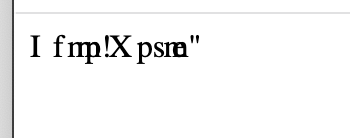
If your website text appears garbled only in Firefox (while it looks fine in Chrome or Safari), the issue might be with font rendering or encoding settings in Firefox. Try clearing the cache, disabling extensions, or checking your website’s CSS and content encoding. For more help, visit the Firefox support website.
I recommend that you raise this on our support platform at https://support.mozilla.org