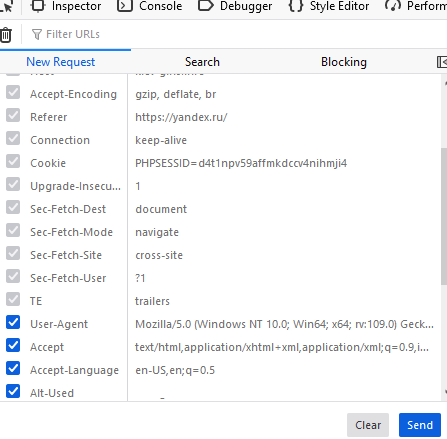
For example I can edit or remove accept header but not Referer as it is grayed out. Why is that functionality nerfed? Isn’t Developer Tools mant for developers? If so what’s the point of limiting them? They could copy it as curl if they wanted, it’s just more annoying.
The simple reason some headers are out is because the browser itself protects them for security and integrity.
If Dev let you instantly change core headers, it could compromise browser security or lead to invalid HTTP requests.
Quick Fix: If you need to test with a custom , your best bet is to Copy the request as URL and edit it in your terminal, or use a third-party extension like Mod Header.
I ran into a similar issue when working with network requests in developer tools. Sometimes certain headers don’t appear due to browser security restrictions like CORS or the way some requests are handled internally.
One workaround I found useful is using external tools or browser extensions for monitoring requests that require full header visibility. Also, double-checking that your request isn’t blocked or altered by ad blockers or privacy settings helps.
For developers who also work with related tools, I’ve found that some AI-powered utilities and browser extensions can simplify debugging and inspecting headers, especially when testing APIs or automated scripts.